How to Create a Pledge List on WhatsApp Using ZenLipa
morrisonmburu7
Mar 05, 2026
2 min read
Managing a pledge list manually in a WhatsApp group is often prone to administrative errors and delayed updates. Using ZenLipa, you can automate this process so that commitments are recorded and broadcast to your group in real time.
Here is the step-by-step process to set up an automated pledge system.
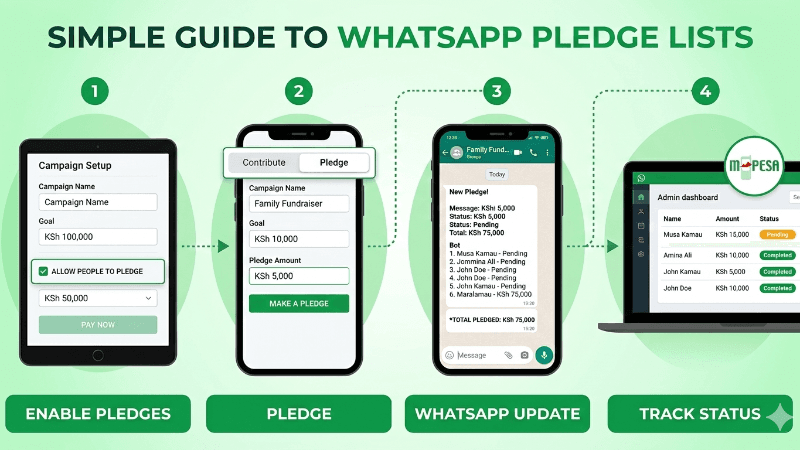
1. Create Your Fundraiser
To begin, log in to your ZenLipa dashboard and select "Create New Fundraiser." Fill in the essential details such as the campaign name, description, and financial target.
-
Critical Step: During the setup process, look for the settings toggle or checkbox labeled "Allow People to Pledge." You must select this option to enable users to make commitments without immediate payment.
2. How Users Submit a Pledge
Once the campaign is live, share your unique campaign link to your WhatsApp group. When a member clicks the link:
-
They will see two options: Contribute or Add Pledge.
-
Upon selecting "Add Pledge," the user enters their name, phone number, and the amount they intend to give.
-
The system logs this commitment instantly and sends real time updates to whatsapp.
3. Real-Time WhatsApp Updates
The core benefit of this integration is the automation of the "Pledge List."
The moment a user submits their pledge via the link, the ZenLipa bot sends an automatic update directly to your linked WhatsApp group. This message typically includes:
-
The name of the person who just pledged.
-
The total amount pledged by the community so far.
-
The progress toward the overall campaign goal.
This removes the need for a treasurer to manually type out and post updated lists, ensuring the group remains informed and motivated.
4. Tracking and Fulfillment
All pledges are stored in your ZenLipa dashboard, categorized by "Pending" and "Completed." When a donor is ready to fulfill their promise, they use the same link to pay via M-PESA. The system automatically reconciles the payment, marking the pledge as fulfilled and updating the group once more.
To set up online fundraising using ZenLipa visit Zenlipa Fundraising
Share this post: